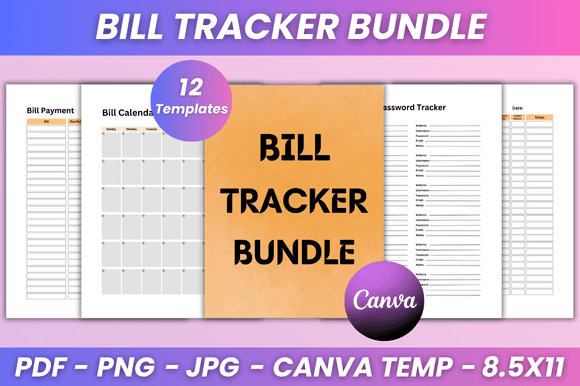
Bill Tracker Bundle KDP Interior: A Practical Tool for Organized Financial Workflows
Managing personal or business finances often feels like a juggling act. Between subscription renewals, utility due dates, irregular payments, and the occasional forgotten invoice, the margin for error is thin. The Bill Tracker Bundle KDP Interior is a structured solution designed to bring clarity to this chaos. It is not merely a set of printable pages; it is a repeatable framework for tracking, planning, and reviewing financial obligations. Whether you are a freelancer juggling multiple income streams, a small business owner overseeing operational costs, or simply someone trying to keep household expenses predictable, this bundle offers a practical way to embed bill tracking into your regular routine.
This article explores how the Bill Tracker Bundle fits into real-world workflows, how to customize it using the editable Canva link, and how to integrate it alongside other planning tools. The goal is to help you move from reactive payment management to proactive financial oversight.
What the Bill Tracker Bundle KDP Interior Offers
At its core, the bundle is a collection of 12 fully editable pages, each designed to address a specific aspect of bill management. The format is print-ready at 8.5 x 11 inches, with no bleed, and is supplied in PDF, JPG, and PNG formats. The clean and minimal design ensures that the focus remains on the data, not on distracting graphics. Every template can be edited in Canva, meaning you can adjust fonts, sizes, colors, layout style, and even add photos to match your personal or brand aesthetic.
The included pages cover the full lifecycle of bill tracking:
- Belongs To page – Personal or business identification, essential if you manage multiple binders or share files with a team.
- Personal Information – A quick reference section for contact details and account numbers.
- Password Tracker – Securely store login credentials for online billing portals, so you never lose access when a payment is due.
- Bill Calendar – An annual or monthly overview of when each bill recurs, helping you anticipate cash flow needs.
- Bill Payment – A dedicated page to record individual payments, including date, amount, method, and confirmation number.
- Bill Tracker – A master log that consolidates all bills in one place, showing status, due dates, and amounts at a glance.
- Monthly Bill Payment Tracker – A month-by-month layout for tracking who was paid, how much, and when.
- Subscription Tracker – Increasingly critical in an era of recurring services; list each subscription, its cost, renewal date, and cancellation terms.
- My Notes and Notes – Open-ended pages for recording observations, disputes, rate changes, or reminders.
- Thank You page – A closing page, useful if you are selling the interior or gifting the planner.
This structure allows you to use the bundle either as a standalone system or as a supplement to a broader financial planning process.
Where the Bundle Fits in Your Workflow
The Bill Tracker Bundle is most effective when integrated before, during, and after your regular bill-paying routine. It is not a passive document; it is a tool that supports action.
Before Payment Day: Preparation and Planning
At the start of each month, open the Bill Calendar and Subscription Tracker pages. List every expected payment for the upcoming weeks. This step shifts you from a reactive mindset—waiting for emails or late notices—to a proactive one. If you use a digital calendar or task manager, transfer the key due dates from the bundle into that system. This creates a cross-reference that alerts you before payments are due.
Use the Personal Information page to verify that account numbers and contact details are current. If you have recently switched banks or updated a credit card, note the change here. This preparation phase reduces the likelihood of failed payments or delays.
During Payment Processing: Execution and Record Keeping
As you make each payment, record it immediately on the Bill Payment page or the Monthly Bill Payment Tracker. Include the exact amount, the payment date, and the method used (e.g., debit card, wire transfer, auto-pay). If you receive a confirmation number or reference ID, note it in the space provided. This real-time logging serves two purposes: it prevents duplicate payments, and it creates an audit trail for future reference.
For subscriptions, update the Password Tracker page with portal credentials as you use them. This habit ensures that when you need to cancel or modify a service, you can access the account without a password reset delay.
After Payment Completion: Review and Adjustment
At the end of each billing cycle, use the Bill Tracker master log to review what was paid and what remains. Compare the actual amounts against your budget or estimates. Did any bill increase unexpectedly? Did you pay any late fees? Note these observations in the Notes page. This review step turns raw data into actionable insight. You might decide to negotiate a lower rate, switch providers, or adjust your monthly budget allocation.
The bundle also supports quarterly or annual reviews. By flipping through past months, you can identify patterns—seasonal spikes, forgotten subscriptions, or recurring overcharges—that would otherwise go unnoticed.
How the Bundle Interacts with Other Tools and Methods
A standalone tracker is useful, but its value multiplies when connected to the rest of your financial ecosystem. The Bill Tracker Bundle is designed to complement, not replace, other systems you already use.
- Digital Calendars – Transfer due dates from the Bill Calendar to Google Calendar, Outlook, or Apple Calendar. Set reminders two days before each payment to give yourself buffer time.
- Budgeting Apps – Use the Monthly Bill Payment Tracker as a source of truth when reconciling entries in apps like YNAB, Mint, or QuickBooks. The bundle provides a physical or offline backup in case of app downtime.
- Bank Statements – At the end of each month, compare your recorded payments against your bank or credit card statements. Discrepancies can be investigated while the transaction is still fresh.
- Tax Preparation – For freelancers and small business owners, the Bill Payment and Bill Tracker pages serve as a simple expense log. During tax season, you can quickly extract deductible amounts without sifting through bank statements.
- Shared Households or Teams – If multiple people manage bills (e.g., a spouse, a business partner, or an assistant), the Belongs To page and clear labeling ensure everyone knows which binder or file is current. The editable Canva link allows you to add custom fields, such as "Approved By" or "Department."
The bundle does not require any special software to use. You can print the PDFs and insert them into a three-ring binder, or you can edit them digitally in Canva and store them in a cloud folder. This flexibility makes it easy to adopt regardless of your preferred medium.
Customization and Usability: Making the Bundle Your Own
The editable Canva link is one of the bundle's strongest features. It allows you to adapt the templates to your exact needs without starting from scratch. Here are practical ways to customize the pages:
- Change fonts and sizes – If the default typography feels too small for easy reading, increase the font size. For a professional look, choose a clean sans-serif font like Montserrat or Inter.
- Adjust colors – Match the color palette to your brand or personal preference. A muted color scheme reduces visual noise, while brighter colors can highlight urgent items.
- Add or remove fields – The Bill Tracker page includes standard columns like "Due Date" and "Amount." You can add columns for "Auto-Pay Status," "Category," or "Payment Method." Similarly, if you do not need the Password Tracker, you can delete that page entirely.
- Insert your logo or photos – Business users can place a company logo on the Belongs To page. For personal use, adding a photo or a motivational quote can make the planner feel more welcoming.
- Duplicate pages – If you need more than 12 pages—for example, additional notes pages or extra monthly trackers—simply duplicate a page in Canva and adjust the content.
Once you have finished editing, export the file as a high-quality PDF, JPG, or PNG. Because the bundle includes all three formats, you can choose whichever works best for your printing or digital workflow. The no-bleed format means you do not need to worry about content being cropped by printers.
Ensuring Consistency and Quality Over Time
A bill tracker is only useful if it is used consistently. The bundle's structure encourages regular engagement, but the habit must be built deliberately. Here are a few observations drawn from practical use:
- Keep it accessible – Store the printed binder or digital file in a location you see daily. Out of sight often means out of mind.
- Schedule a weekly check-in – Block 10 minutes every Monday to update the Bill Tracker and review the coming week's payments. This small routine prevents end-of-month scrambles.
- Use it as a single source of truth – Avoid maintaining separate paper lists and digital notes. Consolidate everything into the bundle to reduce duplication and errors.
- Review the design periodically – As your needs evolve, return to the editable Canva link to update the layout. Adding a new column or adjusting a header takes minutes but keeps the system relevant.
Quality control also means verifying the data you enter. A single wrong due date or amount can cascade into late fees or insufficient funds. Double-check entries against invoices or account statements, especially during the first few months of using the bundle.
Long-Term Value and Adaptability
The Bill Tracker Bundle KDP Interior is not a one-time purchase. The lifetime access and instant download mean you can return to the files whenever you need a fresh copy. If you lose a page, spill coffee on your binder, or want to experiment with a different color scheme, you can simply re-download or re-edit the original templates.
New designs are constantly being added to the creator's collection. This is worth noting because your needs may shift over time. You might start with the personal finance version and later want a more business-oriented layout. The same editable approach applies across the product line, allowing you to maintain consistency even as you switch between different interiors.
For KDP publishers and content creators, this bundle also serves as a ready-to-use product. You can customize the Belongs To and Thank You pages, add your own branding, and publish it as a low-content book. The clean, minimal design appeals to a broad audience, and the editable Canva link makes it easy to localize or personalize for different niches.
Final Thoughts on Integration
Financial organization is not about perfection; it is about reducing friction between intention and action. The Bill Tracker Bundle KDP Interior provides a structured yet flexible framework that fits into almost any workflow. Whether you use it as a standalone planner or as a companion to digital tools, the key is to treat it as a living document—update it regularly, customize it to your preferences, and review it with the same discipline you apply to your finances.
By embedding the bundle into your monthly routine, you gain more than a list of due dates. You gain visibility into your spending patterns, confidence in your payment history, and a sense of control over a domain that often feels overwhelming. That clarity is the real value of the bundle, and it is available the moment you start using it.
I hope you find the Bill Tracker Bundle as practical in your workflow as it is designed to be. Thanks for taking the time to explore how it can fit into your planning process.